Local storage does not answer every privacy question
A smart locket may store the final selected photos directly on the pendant, but that does not establish how the companion app or an AI service handles the original files. Treat transfer, processing, storage, viewing and deletion as separate privacy questions. Check the current policy and keep sensitive media out of the system unless you understand and accept its handling.
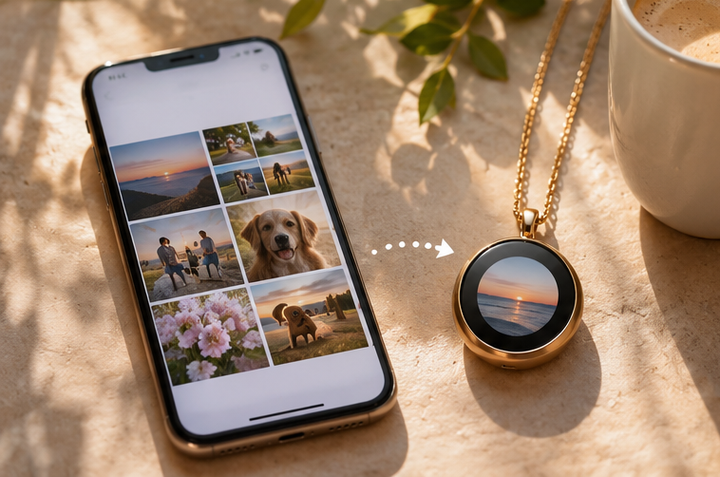
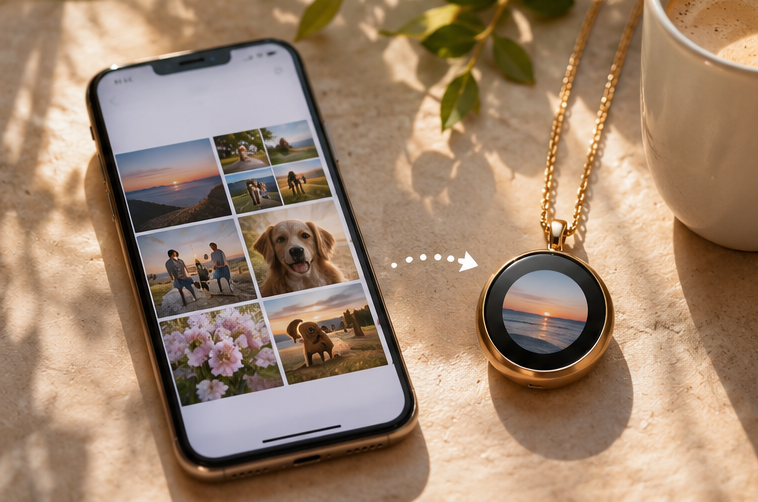
Follow the image from the phone to the pendant
Think about where the picture starts, which app has access to it and where the final version is displayed. The companion app may need access to selected images from your phone and a Bluetooth connection to the necklace. It may also use an account or online service for some operations. A claim that a completed memory is stored on the pendant relates to the final stage; it does not by itself establish that no information was processed elsewhere. The How Smart Lockets Work: Photos, Videos and AI Memories explains the media workflow. Look for an explanation of what is processed remotely, what remains on the phone and what is saved on the wearable. Totwoo's published quick-start information describes saved media on the uploader's phone and the pendant, but that storage statement does not independently establish the handling of inputs during AI generation.
Check the app's permissions
When installing the app, inspect the permissions requested and what they enable. Some phones allow you to grant access only to selected photos instead of your entire library. Use that option if it works with the documented upload process. Bluetooth access may be necessary for finding and connecting the locket; unrelated permissions deserve their own explanation. Check the app publisher before signing in, use a unique password if the account requires one, and protect the phone with its usual access controls. Review permissions again after a major software update rather than assuming they have remained unchanged.
AI generation deserves separate scrutiny
Uploading a photograph to create a synthetic moving memory may expose it to additional processing that ordinary local viewing does not require. Read the applicable privacy notice and look for the purposes of processing, retention periods, deletion options and third-party service involvement. Do not assume that a free feature is private or that a paid feature is automatically safer. Ask the person in the image for permission when appropriate. For sensitive family or memorial photographs, a still image can avoid some of the uncertainty associated with creating new synthetic movement. The How AI Moving Memories Bring Photos to Life explores the distinction between an authentic photo and a generated clip.
Think about who can open the jewellery
Account protection and physical access are not identical. A locket may be associated with an account while its stored content remains viewable when somebody opens it. Check whether the exact model offers any screen lock or authentication before relying on one. If you lose the pendant, do not assume that remote deletion is available; confirm the manufacturer's capabilities. A small public-friendly photograph is a safer choice than an intimate image if you sometimes remove the necklace at work or leave it in a shared room. For photos of children, consider the consequences of exposing the device or sending files to a service.
Gifts and changes of ownership
A prepared gift raises questions about whose account controls the device and whether the recipient can replace or remove the original contents. Use the documented gift process rather than sharing a personal account password. Before selling or passing a locket to another person, back up your original media, remove saved content using the manufacturer's instructions and confirm that the next owner can establish their own connection. Do not rely on simply deleting the companion app to erase data stored on the pendant. If there is no clear ownership transfer process, contact support before handing over the device.
Build a sensible privacy routine
Use a small folder of approved images rather than uploading a large collection indiscriminately. Keep independent originals and avoid putting your only copy on the wearable. Review the current terms when adding a new feature, especially one involving AI. Totwoo's published FAQ and product information describe local viewing, but that statement alone does not establish encryption, independent security audits or comprehensive deletion guarantees. The How to Upload Photos and Videos to a Smart Locket offers a practical transfer routine that lets you test with an ordinary photograph before handling anything more personal. Different connected wearables have different app dependencies; our connected necklace compatibility guide explains why model-specific checks matter.
Frequently asked questions
Is local storage proof of encryption?
No. Encryption and access controls need separate evidence.
Can another person see my photo if they find the locket?
That depends on the device's actual viewing controls. Do not assume a lock or remote wipe exists.
Sources
Smart Lockets Library
Complete guide
Main guides
- Totwoo Tree of Life AI Smart Locket: Features, Benefits and Limitations
- How Smart Lockets Work: Photos, Videos and AI Memories
- Smart Lockets as Meaningful Personalised Gifts
- Smart Locket Setup, Maintenance and Troubleshooting
Supporting guides
- Smart Lockets vs Traditional Photo Lockets
- Totwoo Smart Locket: Gold vs Silver
- Digital Photo Lockets vs Heartbeat Necklaces
- How AI Moving Memories Bring Photos to Life
- How to Upload Photos and Videos to a Smart Locket
- Do Smart Lockets Work Without Internet?
- Smart Lockets for Long-Distance Relationships
- Smart Lockets for Mothers and Grandmothers
- Smart Memorial Lockets for Remembering Loved Ones
- Smart Lockets for Remembering Pets
- Smart Locket Battery Life and Charging Guide
- Smart Locket Not Connecting: Bluetooth and App Troubleshooting
- Are Smart Lockets Waterproof? Everyday Care and Protection